Last updated 2026-10-16
What runs inside Jira, and what runs in MetaFrazo
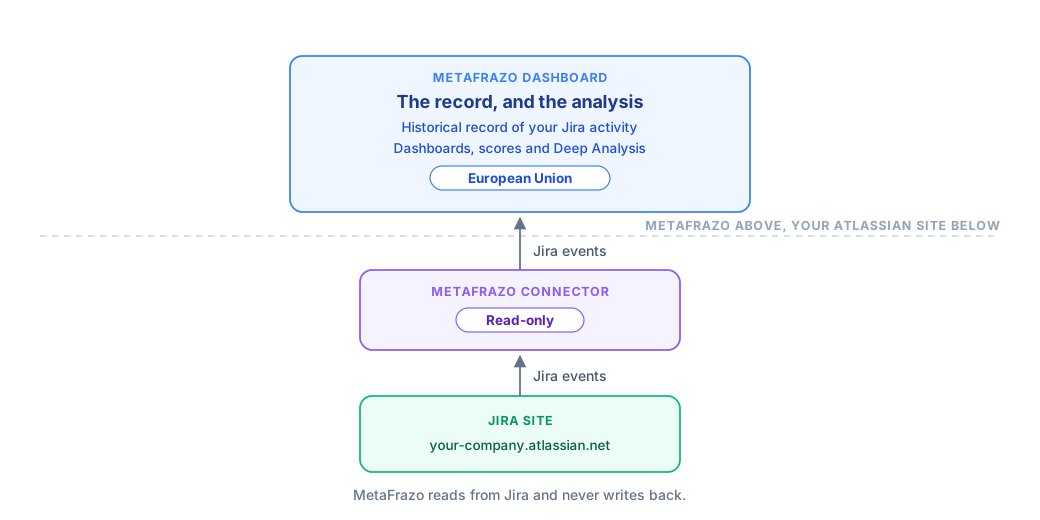
MetaFrazo has two halves. One lives inside your Atlassian site. The other runs on our European platform. Knowing which is which answers most of what a security reviewer will ask, including why the analysis does not run entirely inside Jira.
The short version
| Runs inside your Atlassian site | Runs on MetaFrazo's European platform |
|---|---|
| The connector you install from the Atlassian Marketplace | The historical record of your Jira activity |
| Capturing Jira events as they happen | Every dashboard, score and visual built from it |
| The admin page where you connect your site | Deep Analysis, when you use it |
| Proving the connector's identity to MetaFrazo | Your organization, its members and their roles |
Your Jira workspace stays the system of record. MetaFrazo reads from it and never writes back.
Inside Jira: the connector
The connector is the app you install from the Atlassian Marketplace. It does three things:
- It watches for activity. When an issue is created, moved, assigned, commented on or reconfigured, Jira tells the connector, and the connector forwards that event to MetaFrazo.
- It gives you an admin page. That is where you connect your Jira site to a MetaFrazo organization and check that events are flowing.
- It proves who it is. The connector authenticates using Atlassian's signed app-invocation tokens. There is no Jira password or API token of yours stored in MetaFrazo.
The connector is read-only. It holds the permissions it needs to observe your activity and nothing that would let it change anything in your Jira. It keeps no analysis of its own.
In MetaFrazo Dashboard: the record, and the analysis
Everything on the dashboard is built from a historical record of your Jira activity that MetaFrazo keeps on your behalf.
That record exists because history has to be captured as it happens. Asking what an issue looks like today is easy. Asking what your whole portfolio looked like on a Tuesday three months ago, or how long work has been sitting in each stage month over month, requires that someone was recording it at the time. That record is what MetaFrazo keeps, and it is what the product is.
The questions we ask of it matter just as much. A single panel may read across every project and every month you have been connected, and answer in the time it takes a page to load.
Why the analysis runs on our platform
Atlassian's app platform hosts app configuration, app state and the interactive surfaces that live inside Jira. It is well suited to that, and it is where our connector runs.
Reconstructing many months of activity and computing across all of it at once is a different kind of work, closer to a reporting warehouse than to an app's own settings. Products that answer that kind of question generally keep a store built for analysis and query it there. Atlassian takes the same approach for its own reporting, reading from a separate analytics store rather than from the live product database.
That is why the split falls where it does: capture and configuration inside Jira, history and analysis on our platform.
What this means for "Runs on Atlassian"
MetaFrazo's connector is a Forge app, built and hosted on Atlassian's platform. Runs on Atlassian is a further Marketplace badge, for apps that use Atlassian-hosted compute and storage exclusively. Because MetaFrazo's historical record and analysis run on our own European platform, MetaFrazo does not carry that badge.
What we commit to instead:
- One region. Your data is stored and processed in the European Union. Security and hosting has the detail, including how AI analysis is handled.
- Read-only. The connector cannot change anything in your Jira, and MetaFrazo Dashboard never writes back.
- No open doors. MetaFrazo exposes no public API, and the connector talks to exactly one MetaFrazo endpoint.
- Separation enforced beneath the application. One organization cannot read another's data, and that boundary sits under the application rather than inside it. See Data isolation.
- A current sub-processor list. Maintained under Terms and policies rather than restated here, so it never goes stale.
- Deletion. Uninstalling the connector ends collection. Your site's data is kept for 30 days after the last connector is removed, then permanently deleted, and it can be deleted sooner on request. See How do I delete my account.
If your review needs more than this page covers, ask us and we will answer it directly.