Last updated 2026-08-12
How organizations and Jira connectors fit together
Almost everything in MetaFrazo is scoped to one organization. Knowing what an organization is, and how it relates to the Jira site you connected, explains most of what you will run into later: why a second Jira site produces a second dashboard, why your role can differ between them, and why nothing is ever mixed across the two.
The three pieces
| Piece | What it is | Who runs it |
|---|---|---|
| Jira site | Your Atlassian workspace, the thing at yourcompany.atlassian.net. | Atlassian |
| MetaFrazo connector | The app you install on that site from the Atlassian Marketplace. It forwards Jira events to MetaFrazo. It is read-only and never writes back into Jira. | Atlassian's platform |
| MetaFrazo organization | Your tenant in MetaFrazo: members, roles, settings, plan, and the Jira history collected from your site. | MetaFrazo |
One connector, one organization
When a Jira administrator installs the connector and finishes setup, MetaFrazo creates a new organization and makes that administrator its first owner. That is the only way an organization comes into existence. There is no "create organization" button, because an organization with no connected Jira site would have nothing to show.
The relationship is one to one:
- A Jira site is connected to exactly one MetaFrazo organization at a time.
- An organization holds the history of exactly one Jira site.
There is deliberately no "add this site to my existing organization" option. Your Atlassian subscription is per site, and the plan you get in MetaFrazo follows that subscription, so keeping the two aligned one to one is what makes entitlements and billing predictable. If a single dashboard spanning several sites matters to you, tell us through support. It is a product decision on our side, not a setting you are failing to find.
More than one Jira site
Connect a second site exactly the way you connected the first: install the connector on it, open the setup link, finish setup. See How do I connect my Jira workspace? for the full flow. You end up with a second MetaFrazo organization.
From then on:
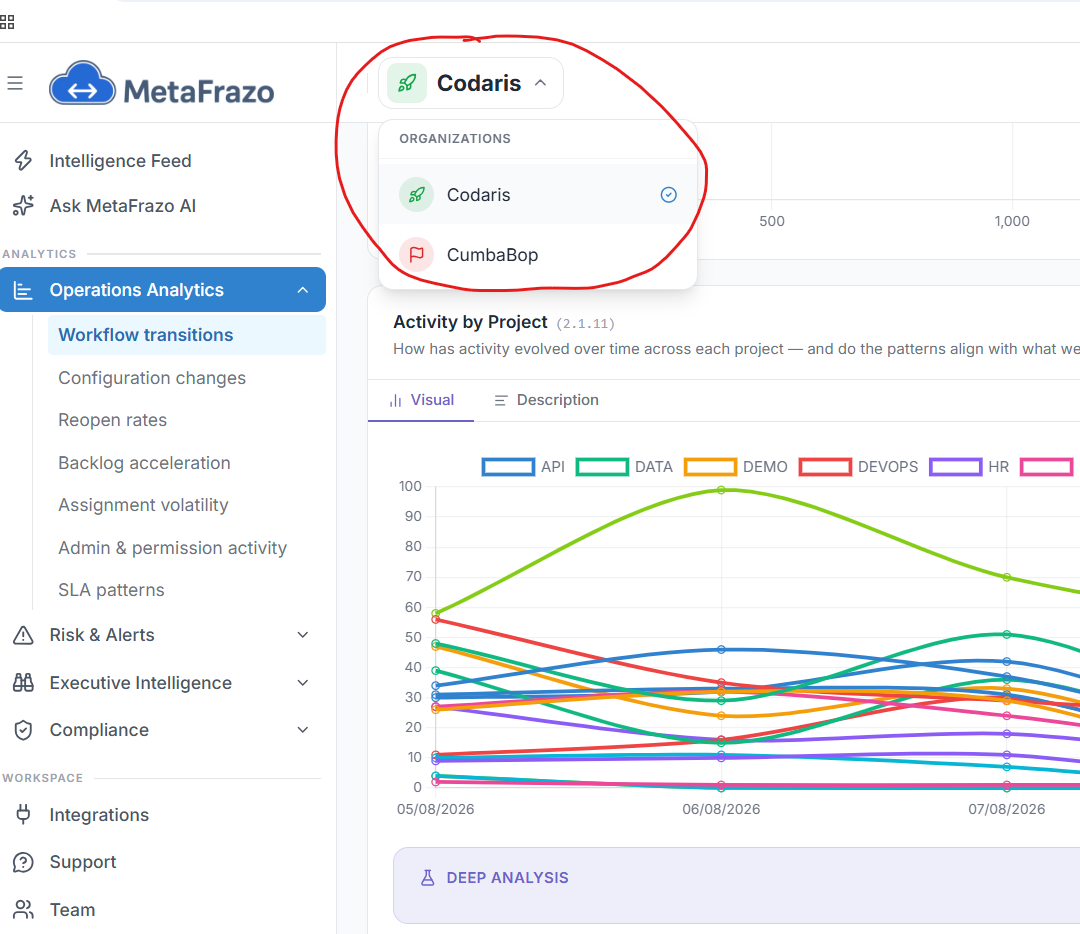
- The organization name in the dashboard top bar turns into a switcher. Click it and you get an Organizations list of every organization you belong to, with a check mark on the one you are currently viewing. With a single organization the name is plain text and there is nothing to switch.
- Picking a different organization reloads the dashboard scoped to it. MetaFrazo remembers the choice, so you land in the same organization the next time you sign in.
- Every page, KPI, and chart belongs to exactly one organization. There is no combined view across organizations, and no number anywhere in the product blends two of them.
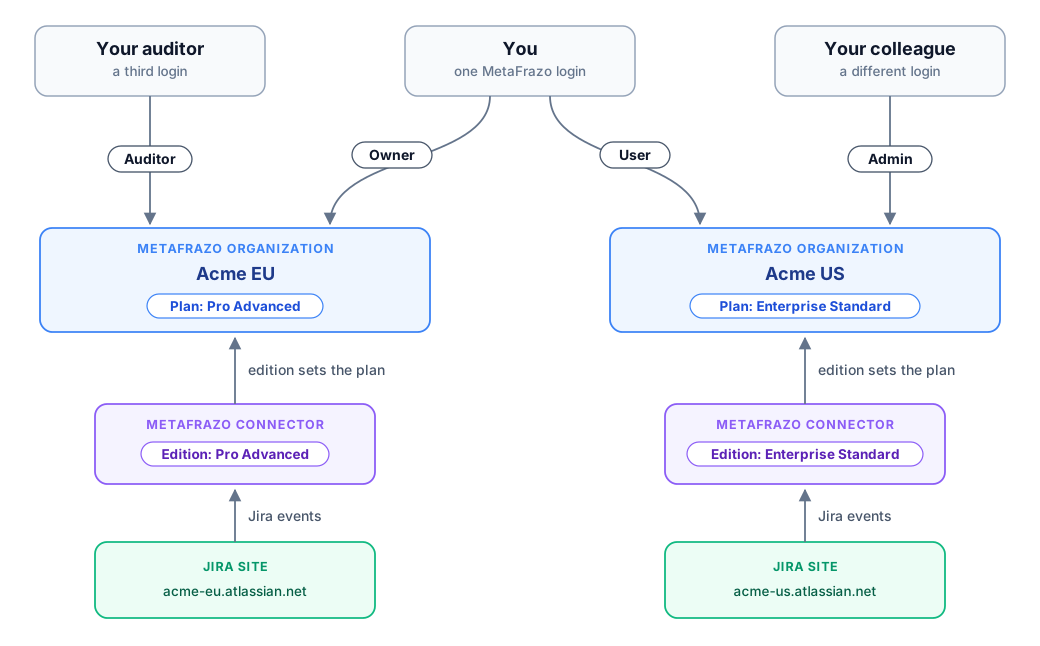
One account, several organizations, one role in each
Your MetaFrazo login is a single account. It can be a member of any number of organizations, and your role is set independently in each one: owner of the organization you set up, auditor in a colleague's, user in a third. What each role may do is described in Roles and permissions.
Being an owner in one organization grants you nothing in another. Invitations, role changes, and removals are all per organization, and so is the audit trail that records them. See How do I add a teammate? for the invite flow.
What stays separate
Everything below is held per organization, with no path between them:
- Members, roles, and pending invitations.
- The membership and configuration audit trail.
- Jira events, and every dashboard, KPI, and score computed from them.
- The AI provider choice and any API key you supply, see Choosing an AI provider.
- The plan and the features it unlocks.
- Deletion. Deleting one organization leaves the others untouched.
Only your login identity is shared: your email, your sign-in method, your profile, and personal preferences such as theme and date format.
None of this softens when both organizations happen to be yours. The database enforces the same boundary between two organizations you own that it enforces between you and an unrelated customer, and it does so beneath the application rather than inside it. How is my organization's data isolated from other tenants? explains how that is built and how we test it.
Plans follow the connector
Each connected site carries its own Atlassian Marketplace subscription, and the edition on that subscription sets the plan of the organization the site is connected to. Change the edition in Atlassian and MetaFrazo picks it up from the connector within a few minutes. There is nothing to enter on our side, and no separate MetaFrazo billing account.
Two organizations of yours can therefore sit on different plans and see a different set of features. That is expected: they are two separate subscriptions.
More than one connector on the same site
You can end up with two MetaFrazo apps installed on one Jira site, most often while evaluating the Enterprise app on a site that already runs the Pro app. This does not create a second organization and does not double count events. MetaFrazo elects one installation as the active forwarder for the site and holds the others in standby, which the Integrations page shows per installation. Only the active one sends events.
When a site is already connected
If you open a setup link for a Jira site that is already connected to an active organization:
- If you are a member of that organization, nothing changes and you are returned to the dashboard.
- If you are not a member, MetaFrazo refuses and says so. Ask an owner or admin of that organization to invite you, or contact support to have the site migrated.
That refusal is deliberate. Without it, anyone who can install an app on your Jira site could attach it to an existing MetaFrazo organization and read its dashboards.
Reconnecting a site whose organization was deleted
A Jira site whose organization was deleted or deactivated can be connected again, and it gets a brand new organization. Because the earlier history belongs to a different set of people, setup asks you to confirm a fresh start and then moves the earlier events out of the new organization's reach rather than into it. Nobody in the new organization can see them.
If it is the same customer coming back and you want that history on the new connection, contact support promptly. Recovery is possible for a limited period only.
Where to go from here
- How do I connect my Jira workspace?: the install and setup flow, step by step.
- Roles and permissions: what each role may do inside one organization.
- How do I add a teammate?: inviting people into the organization you are in.
- How is my organization's data isolated from other tenants?: the boundary itself, and how it is enforced.
- Why don't I see any events yet?: when a newly connected site stays quiet.